Low res photo dimensions when printed

No need to be a smartarse about it.

The mythical 300 PPI comes from the following - its 150*2 which most printers stick to.

That’s only if their LPI on the output device is set to 150 LPI.

In newspapers this is lower as the ink saturates into the paper, they don’t need that many lines per inch.

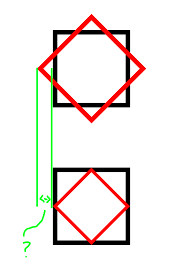
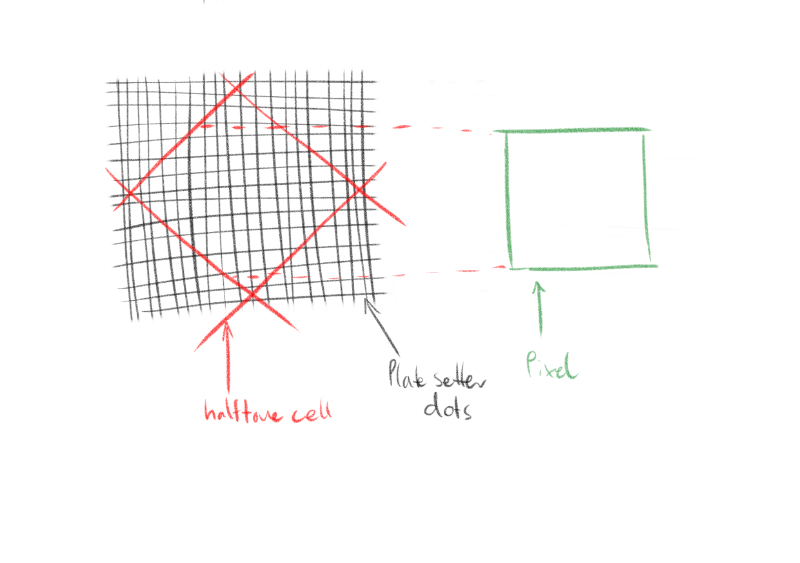
And when the halftone square is output it’s rotated at 45 degrees.

And a square that is rotated 45 degrees from tip to tip is always going to be exactly 1.41 times the side of both sides.

image

And it’s 1.41 that is multiplied by the LPI - not the mythical 2 that people stick to - or rather they do this to make it an easier calculation.

So you can’t definitely say that 150 PPI will be fine for print if you don’t the output device, or the LPI or the method of output.

In fact - you can’t have it 150 PPI is unless you have an LPI of at least 107 LPI.

The higher the LPI on the device, the larger your PPI has to be for print - at least in Litho.

In fact, that’s why I said 211.5 PPI - as that’s 150 *1.41.

In digital printing it’s a lot more forgiving, but that’s a different kettle of fish and print output method compared to printing with inks/litho/plates etc.

Again - it also relies heavily on the content of the image - if it’s a simple foggy image with little detail - then it’s going to be fine at lower PPI. But if it’s a nice sharp picture with very defined edges and things like that, a face, or a picture of a boat on a sunny day, then having a higher PPI is preferable.

We can mostly agree that PPI doesn’t have to be 300 PPI or even 250 or even 220.

But 150 PPI on a image that you haven’t seen - you can’t make that call without knowing many factors.

That’s why it’s important to speak with the print vendor. They could print FM/AM/XM - or digitally - or another method.

But letting them know is a good step and they can try whatever they can on their end to make it look as good as possible.

Sometimes you know they might even suggest reducing the size of the book or printed piece from A4 to A5.

Or to scale the A4 by 10% and they can do that and it can bump up the PPI of the image.

Ok you get a smaller than required A4 - by 10% but you could improve the image enough that it doesn’t turn out like crap.

There’s always solutions.

Thank You so much for taking time to answer me! This helps a lot, but please let me continue a bit. Aspect ratio needs to remain same but new size is not fixed, the print quality can determine size. Maybe better question from me would have been, how I can see the size of the print if I change resolution from 72ppi to 200ppi or even to 300ppi.

The file is now 2048px X 1152px 72ppi as told. When I first change resolution from 72ppi to 300ppi and then uncheck resample box I get 17,34cm X 9,75cm 300ppi… then I click ok and save it. When I open this new file, aspect ratio is same and when I check image size, dimensions are the same 2048px X 1152px but the resolution is now 17,34cm X 9,75cm 300ppi. In this way I´m not upscaling the photo if I let resolution determine the print size? The quality is the best possible. Did I get it right? For magazines 300ppi version with good quality and if needed a bit bigger for newspapers @240ppi it would be 21,67cm wide (original is quite nice and sharp).

Just hand over the file to the Printers and ask them what they can do and tell them what size you need it and ask for their opinion.

Changing it from 2048px x 1152 px @ 72 ppi - to another resolution is shifting numbers around in a calculation exercise.

There’s no need.

The printers will size it and tell you if it will work or not.

If it’s to be viewed from a distance, like a poster - you definitely don’t need 300ppi. Even 150ppi would be fine or even 90ppi.
But that’s a viewing distance calculation - and has other factors.

Save yourself the trouble of destroying your image more by messing about with numbers. Pass the file to the printers and ask them to resize it to the size you want and ask them to tell you if the resolution will be ok.

Newspapers at 240ppi - way too much - you could as low 112.8-170ppi.
But you’d need to check with the print vendor.

Another reason for handing the file to the printers is that often the printers output RIP is often better at resizing images for output on the device compared to Adobes interpolation methods.

The raw file in it’s current state will be better to hand over than trying to fit a square peg in a round hole and carving off the edges to make it fit.

Lets say we angle the screens for the colors at 0, 15, 45 and 75 degrees:

Depending on the tone value of a pixel, different numbers of dots are controlled in the raster cell. For this purpose, it is necessary that independent information is available linearly for each halftone dot.
This leads to the formula √ 2:1 which would mean round about 1.5 To have a bit leeway and room for size changes we used to work with 2 as the quality factor. But factor 1 is absolutely fine if you are in a tight spot. Nobody* will notice.

*Nobody for small values of clients.

When I first change resolution from 72ppi to 300ppi and then uncheck resample box

No, first uncheck resample box, then change ppi value. But yes: at 300ppi your picture could be printed 10.84×9.75cm, at 200 ppi 26.01×14.63cm, and at 150ppi 34.68×19.51cm

In todays world it is more and more rare to even be able to speak to a printer directly. Most clients want the cheapest, which are online printing services.

Edit: Oh, I just saw that you run a print shop. I haven’t been able to steer my clients to a business like yours for a few years now :cry:

This just brilliant. Thank You very much, I´ll be fine with this photo.

Thank You for this. Very good information for a beginner like me!

1 Like

I dont know what world you live in. Online services have strict guidelines you have to follow them or they wont accept the artwork.

I always recommend using local vendors, its far more convenient and always happy to help.

Even online printers will have a contact us page.

Theres really nothing wrong with opening up communication amd expectations from the start.

I agree with @Smurf2 on this.

I tried to keep my original answers brief because going into detail risked confusing the original poster even more than he already was.

The main reason for the 300-ppi rule of thumb is, first, it’s a good, round number that people can remember and, second, it provides some wiggle room to work with the photo when placing it into the layout.

I’ll state again, though, that 150 ppi is way too low for standard-quality offset or its digital equivalent. By that, I’m referring to instances where a more-or-less standard 150-lpi halftone screen is used. As already mentioned, the lower the lpi is, the lower the ppi can be. At a newspaper where 85-lpi halftones are common or on billboards where the lpi can get down into single digits, the ppi can be reduced proportionately.

For a high-quality photo meant to be seen at arm’s length, printed offset on good paper, the resolution should be no lower than 240–250 ppi or it risks compromising the detail in the photo — especially when the photo contains lots of sharp detail. Even then, lots depends on the photo. An intentionally blurry photo with few sharp detail can look perfectly fine at even lower resolutions.

Yes, if I understand your question correctly, you got it right, but as already mentioned, the photo doesn’t need to be 300 ppi. Assuming a halftone frequency of 150 lines per inch, you can get away with resolutions down to around 240–250 ppi without being concerned. What won’t do any good (in most instances) is upsampling the photo to artificially boost the ppi — that just stretches the existing image across more pixels without accomplishing much of anything.

If possible, and if you’re still doubting the results, as Smurf2 said, ask your printer. However, that’s sometimes not practical.

The newspaper where I worked printed the daily paper at 85 lines per inch, so we sampled all the photos to about 170-ppi, which gave us some wiggle room to resize the photo in the layout. Realistically, without doing the math, 140–150 lpi would likely be fine. 240 pixels per inch for newspaper work is overkill.

I can almost agree. For someone in a tight spot and where the photo isn’t that good to begin with and where nobody will be paying much attention, the lower resolutions you mentioned likely won’t be noticed. I’ve done it myself when needed, but only when other options aren’t available. I’d not be inclined to call it “absolutely fine,” though — especially in those instances where the photo will run large and, as Onion_5 put it, the “original is quite nice and sharp.”
It is 1.41. Thats the exact correct figure.

Of course you can use whatever you like but it is bad advice to go any lower.

If for yourself you can do what you like. But to offer advice to someone else to go below the recommended and correct mathematical resolution is really bad.

We have to be careful. We dont even know the LPI or if its being printed digitally or not.

As this is someone elses request for info we have to give accurate and not guesses in the advice

The situation is that I´ll pass the jpeg file over to it’s owners. At the same time I must confess that I´v done a bad mistake by loosing the backup and raw files. After external hdd suddenly died (reading head) all is left is this file, originally made for FB use. I want to be able to explain what it means in practice when the photo is printed in newspapers and magazines. Based on what I´v learned from You, everything seems to be better as I first thought. So once again, thank You for big help!

If it’s just a failed head with little or no damage to the disc, it can likely be fixed or have the data recovered. You probably know that, though.

What is FB use?
FB to me means flatbed printing and that resolution is all dependent on viewing distance somewhere in teh 75-150ppi range.

Billboards are generally 30ppi full scale. Not single digits. I don’t print anything under 25ppi. Or at least not on purpose.

Even for a good quality lambda print, for say, an educational museum exhibit, 200ppi is more than adequate. 150ppi if using any of the digital inkjets. Art prints you want to go high 400-600.

No idea what the OP is printing here (and I mighta missed where they may have said.) We’re all assuming it is litho/offset/digital offset. That might be wrong

Unfortunately some damage on disc. I took it to data recovery service. They change the head in next days and after some time we’ll know is there anything to recover. I had backup but by a stupid mistake lost it. I´ll have a tattoo on my hand with “backup now” text…

FB meaning Facebook in my post. I´v learned that 2048px wide would be good for a Facebook use. Printing of this file will be done someone in a newspaper or in a magazine. But as I wrote, I´v learned a lot from You. Thanks again!

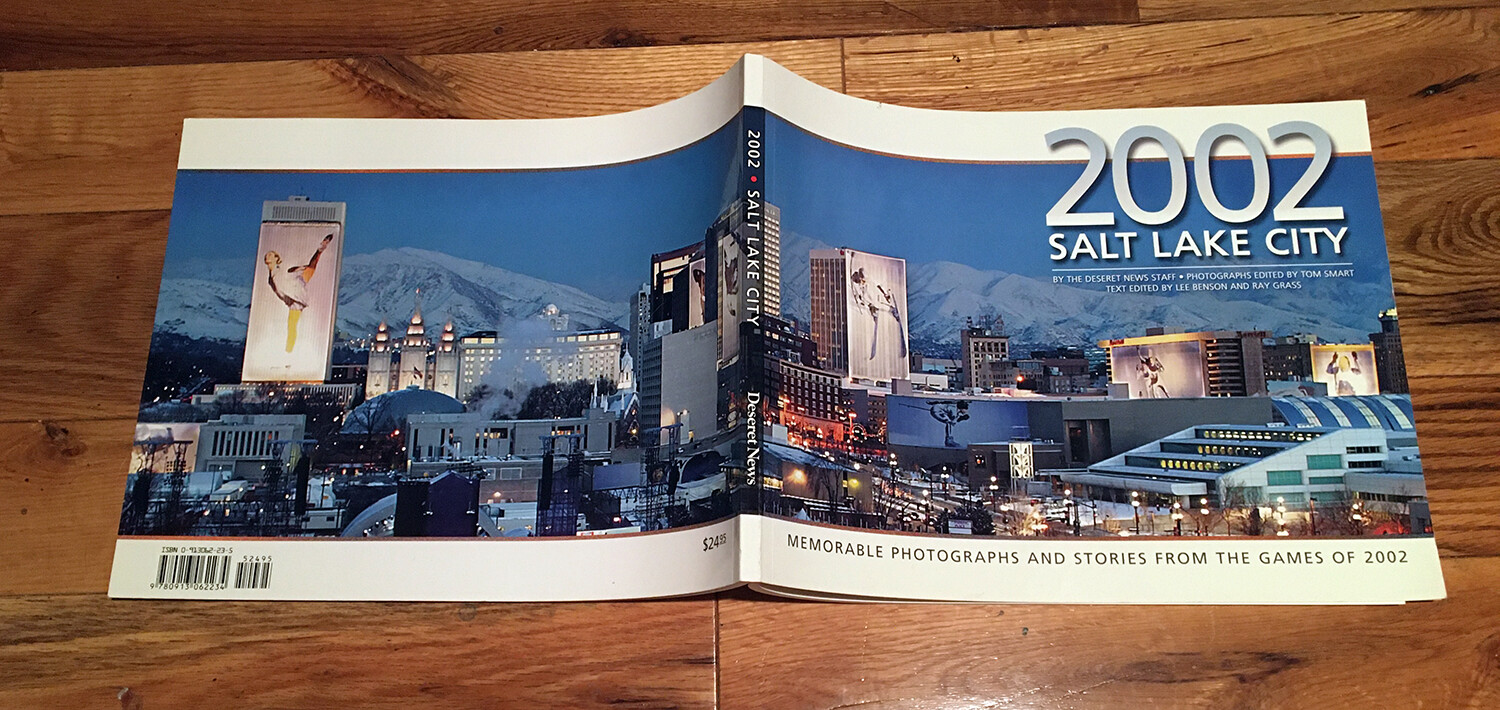
Just to clarify, I was referring to lpi not ppi when I mentioned single digits. There are, of course, no halftone dots with large-format digital printing, so lpi doesn’t translate very well but out of habit, I still think in those terms. Even then, as you mentioned, print quality in large format hardly ever gets that low. I was marginally involved with some of the huge banners that hung from some of the tallest buildings here in SLC during the winter olympics (below) that were easily the equivalent of single digits, but that was really an exception.

Way back in college (before digital printing — late '70s), I had a summer job at a screen printing shop. We mostly worked on museum displays and exhibits of various kinds, but there was also the occasional semi-permanent, housing subdivision billboard job that would come through.

Screen printing being what it is, we needed to use actual halftone dots to simulate a single-color continuous tone image. I don’t remember the exact lpi of the halftone, but I remember the dots seeming nearly as big around as the end of my little finger, so maybe 4–5 lpi. They looked a little rough from the highway, but for the time, acceptable, I guess.

Those big building banners sometimes run more “inches per dot” than dot per inch, LOL. I’ve avoided those things like the plague. So far, knock on wood, so good.

edit:
(I just realized that old saying has new meaning in the age of Covid. Maybe I need to step up my game a bit and more like avoid things as if they were a T-rex or something…LOL.)

1 Like