Will AI replace graphic designers?

:robot: Will AI replace graphic designers?

AI tools like ChatGPT, Midjourney, and DALL·E are getting faster, smarter, and more capable.
They can create visuals, refine layouts, and even suggest design ideas in seconds.

But here’s the big question for our industry:
Will AI eventually replace us… or simply change how we work?

Vote below :point_down:

  • Yes, it’s inevitable
  • No, creativity is human
  • It will change, not replace
  • Not sure yet

:speech_balloon: Drop your thoughts in the comments — your perspective will be featured in our upcoming blog alongside results from 5 other designer polls.

#AIinDesign #GraphicDesign #DesignCommunity #CreativeCareer #FiveElements

I cannot vote. None of the options apply.
Some graphic designers do work which will probably be done by AI in the future.
Some graphic designers do work which will probably be never done by AI.

3 Likes

^what he said

And until the day AI can fabricate and install graphics, my job is safe too. Probably well beyond when I retire.

3 Likes

I doubt so much AI at this moment could not replace Graphic Designers. They cannot think themselves and they just follow instructions. I just see that AI and Graphic Designers working together.

3 Likes

As others have said it will unlikely replace graphic designers. Ai, more specifically LLM, are just very advanced algorithms with elevated pattern recognition abilities that follow instructions. They don’t have any autonomy or capacity to “think”, so that’s obviously not going to happen. I think it will just be a tool that will become part of the designing process.

2 Likes

And with news like this one : AI Industry Horrified To Face Largest Copyright Class Action Ever Certified - Slashdot which future is going to have AI ?

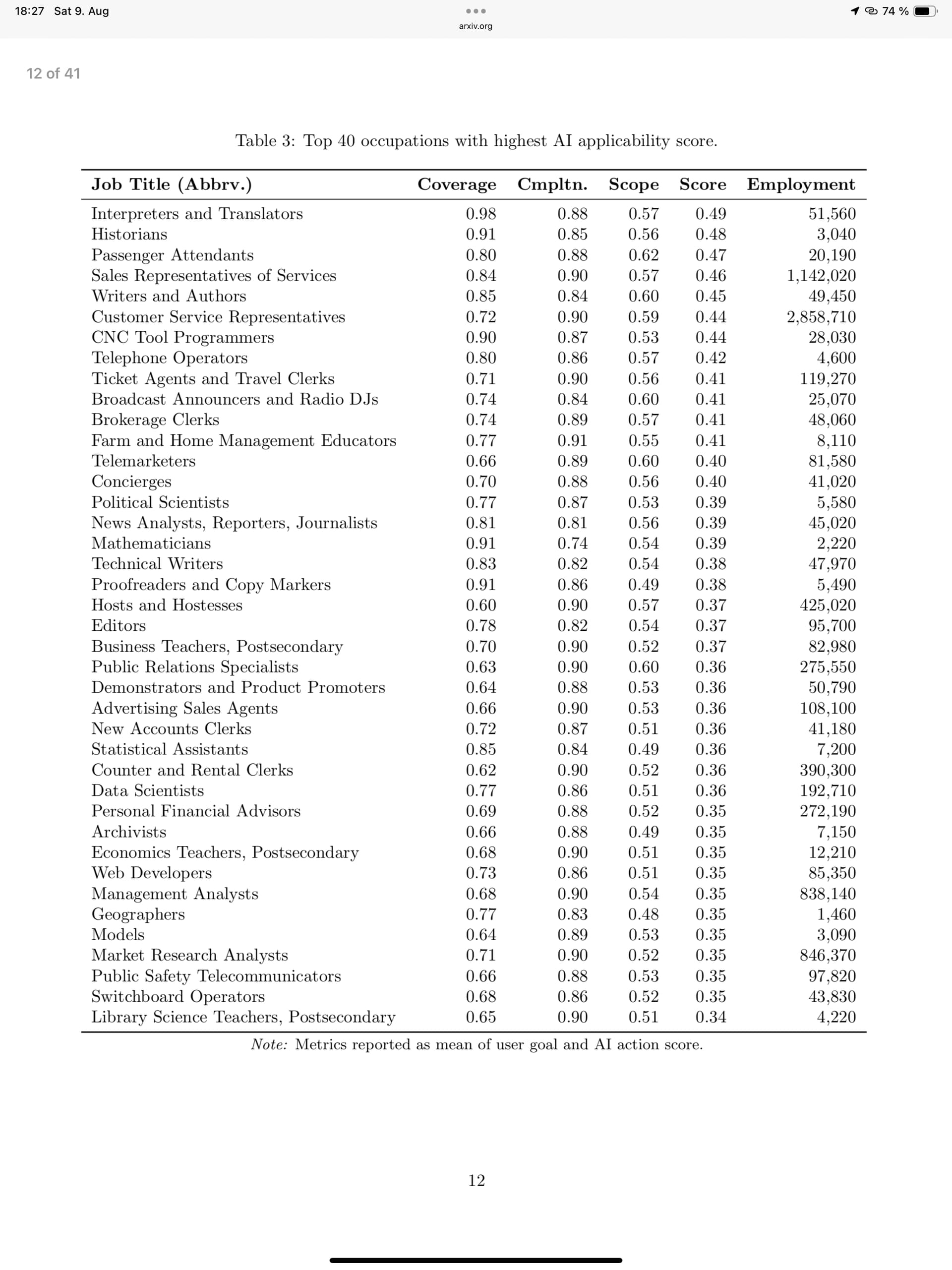
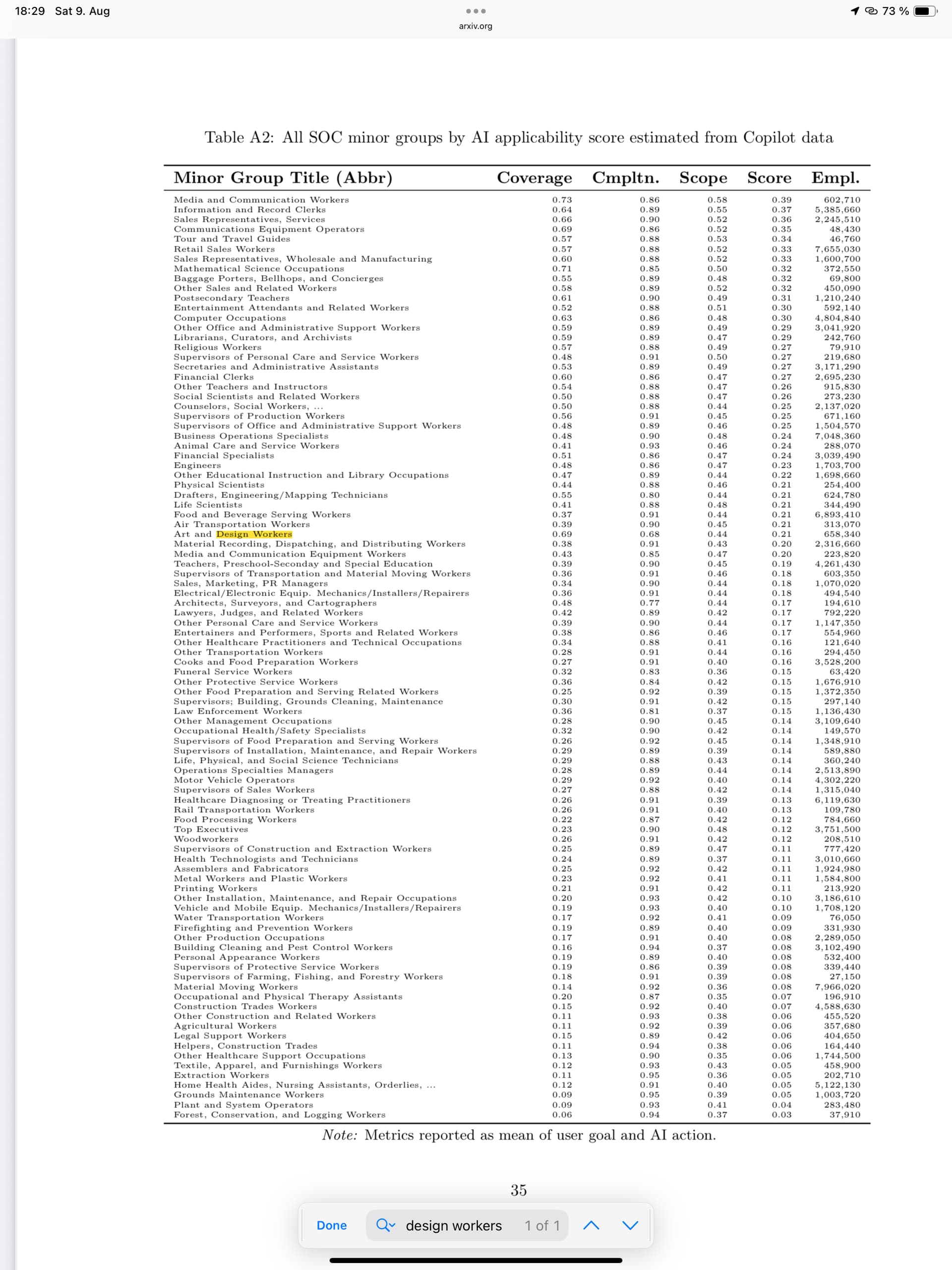
I leave that here https://arxiv.org/pdf/2507.07935


2 Likes

Kind of funny that the original post sounds like it was written by AI.

4 Likes

Lol! Yes it certainly does!

1 Like

Bump because I’ve just had the third job in as many weeks from a customer that they designed using AI. These are leaflets for builders and roofers, not an obviously tech-savvy demographic.

They are doing the design using AI, and because they don’t want to pay for it they are sending me the low-res artwork that is produced. Apparently, it’s now my job to fix it up so it’s good enough to print. I can see this becoming the majority of my work from now on and I’m going to need to develop a new workflow to do this.

This time last year, this kind of thing was “yeah maybe one day” and now I’m officially living in the future.

3 Likes

One thing that often gets missed in the “AI will replace designers” discussion is where the real cost actually sits and it’s usually time, not tools.

I’ve had this conversation with clients plenty of times. They’ll spend hours (or days) tweaking low-res designs themselves, whether that’s in Canva, PowerPoint, or now with AI tools. By the time it gets sent over, the concept is mostly there… but then it still has to be rebuilt properly for print or production anyway.

So the client has paid in time, and the designer still has to do the technical work colour management, resolution, bleed, formats, consistency, and making sure it actually works in the real world. That double-handling is where it becomes less cost-effective.

If the same client sent the raw content or even a rough idea from the start, the designer could jump straight to a print-ready solution in fewer steps, fewer revisions, and less overall cost. AI doesn’t really change that it just makes the “rough draft” phase faster, not the finished outcome.

AI is great for exploration and speed, but it doesn’t remove the need for professional judgement or accountability. Like most tools before it, it shifts where time is spent it doesn’t replace the role itself.

That’s why I see AI as changing the workflow, not eliminating designers.

1 Like

Imagine if AI could learn the rules of print production, and apply them correctly.
Here’s what Googoo AI told me when asking how to set up a 40’ banner for print

Use Vector & High Resolution: Use vector shapes for text and logos. If using raster images (photos), ensure they are high-resolution (e.g., 150-300 dpi at the final print size, or scaled up to 1500-3000 dpi at your scaled-down design size).
:rofl:
No wonder I get files that measure in gigabytes. Googoo said so! :frowning_face:
I will admit that Step 1 was “contact the print vendor for exact specifications.”

2 Likes

When I get obviously wrong information from them, like that, I sometimes argue until they admit they’re wrong. It’s sort of fun to mess with them.

2 Likes

I’m a 61-year-old retired Art Director doing freelance work, and I’m starting to learn AI. For me, I hated hunting down clip art or even purchasing it; now that’s nonexistent. A good descriptive prompt, and there it is, don’t get me wrong, I still use Ill, PS a lot, my workflow is faster and more creative.

1 Like