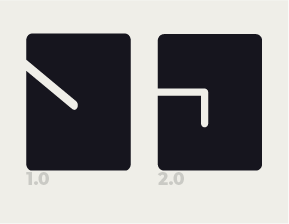
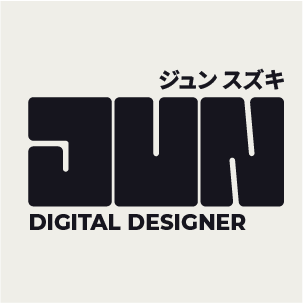
I’m afraid, for me, it’s now lost some of its minimal elegance. The change to the J makes sense for legibility, but it now feels clunkier, especially now you have rounded it all off. It is feeling a bit ‘normal’ now, whereas as before. I feel the tweaks you needed to make were far more subtle.
[As an aside, I read something the other day, which made me smile: ‘Whoever put the b in subtle was a genius’]
Anyway, I digress … if you are goi go to stick with the new J, the line position needs changing. Think of an actual ultra bold J and where the weights and stresses are. This would make a very clunky J. You need to retain that kind of minimal elegance that looks natural and instinctive, but in reality, usually involves many hours of refinement.
The kerning on the bottom text is still not quite right. Moist people turn text upside down to expose the holes in it. Another trick, I use is to see it in threes, so, treat dig as a three letter word that needs even visual space, then igi, then git, etc. This may not work for you. It’s just something I devised for myself that works for me. The go back and see the word as a whole.
IT is now too tight. TA still too loose. DE is better. SI now too tight. Me better, but GN now feels like it’s opened up a bit. Unfortunately, it takes years to get kerning. It’s not an exact science and each designer will probably do it slightly differently, but the end result will be even with no visual interruptions.
The was a great app called typespace. I just went to get the link and it seems to have disappeared from the AppStore. It was a sort of game whereby you had to kern words in different fonts and up it would tell you how far out you are. I didn’t always agree with some of their ‘correct’ solutions, but I wish I’d had it when I was learning how to.
Found it. It’s no longer an app, but there is a website: kerntype. Give it a go. You’ll lose whole chunks of your life to it!