I’ve always been curious how other designers handle this.
When you’re working on a client project with lots of revisions, what’s your workflow for keeping track of different versions?
Do you create a new file each time, rely on version history, or have another system? Has your approach ever let you down, or has it worked well for you?
Similar to @PrintDriver I create a new file, with a new version number amended to the end of the file name. When the job is archived I also delete the previous versions. Not only do I do that for (as PD mentioned) reverting back to a previous version if asked, but also (while less common now) if a file gets corrupted, I have a previous version that I can use to re-build the file.
The ‘go back to rev 1 while you’re on rev 4’ thing how often does that actually happen? And when it does, is digging through the Do Not Use folder easy, or does it turn into a whole search?
I’ve always made a point of minimizing changes through good communications before they can be called revisions. By the time I build the production artwork, the client has already signed off on it, or I don’t begin.
Of course, there are sometimes last-minute changes for various reasons, but I get a bit cranky when clients want multiple revisions or change their minds over trivial, personal opinions or something they forgot to tell me earlier. That’s when my hourly rate kicks in, which is on top of whatever fee we agreed upon.
That’s a smart approach handling it upstream so you’re not managing five versions of the same file later. Curious how clients react when the hourly rate kicks in, does it usually stop the back-and-forth pretty fast?
Unless it’s a longer-term client with whom I have a solid working relationship, there’s always a contract that specifies the terms, what qualifies as revisions, and the hourly rate they’ll be charged for major or multiple revisions.
In the past, I’ve wasted far too much time on clients who believe I have unlimited time for their projects, so I nip it in the bud. I’m diplomatic about the whole thing, but if they don’t agree up front to the terms of the working relationship, I don’t take the job. I’ve learned to say “no” over the years, and it typically works.
Workflow 1: I use the Share feature in Acrobat to share an online PDF to my contact, who will then forward to everyone on their proofing team. Everyone adds comments through their browser window, and everyone can see everyone else’s comments being added in real time. They can respond to each other within the comments window, and I can track what they are saying. When my client says they are done with the proof, I will use the Unshare feature so they can’t make any further comments.
Typically, I’ll quote a flat rate for the first 3 proofs, then the hourly rate begins. The clients who are budget-minded are very serious about getting it done in 3 proofs or less. There are others who absolutely do not care, and will run through a dozen or more proofs. I don’t mind because its hourly at that point.
Workflow 2: InDesign/InCopy. This is for publications. I design in ID, and the file is in the cloud, and the contact can make text changes to it using their subscription to InCopy. No need to keep track of versions.
I wish I could let go like that, but I lose all enthusiasm for the work when clients attempt to do this.
If they have an idea that I think is good, I have no hesitation in running with it before they sign off on the final concept and before I begin producing the production artwork. When they point out mistakes, I’ll always fix them.
When they start art directing me with random opinions and expecting me to be the hands to implement their erratic and naive ideas, I need to fight the urge to walk out the door, which I’ve done on occasion.
Admittedly, by the time most stuff gets to me, if there are more than 2 additional revisions, I tend to get really cranky. The revision after the print proof is the most annoying. That print is to check for MY mistakes. It is NOT an additional opportunity to change your text/images.
(Well… it is if you pay the $$$ per hour for my time, and a new proof…and your project deadline allows for the additional time and lost spot on the printer queue. Yes 3-figures per hour for my time.)
I usually find it easier to keep one master file and use clear version numbers rather than creating a completely separate working file for every revision. Something like V01, V02, V03 makes it much easier to trace what changed.
I also try to keep a short revision note with each version, especially when a client gives several changes at once. That way, if they later ask to bring something back from an earlier version, it’s much easier to find.
The biggest thing for me is separating “client feedback” from “personal tweaks.” Otherwise, it’s surprisingly easy to lose track of which changes were actually requested.
I keep everything in case a previous version becomes relevant again or if I need some elements from it. In the beginning of what was then called Desk top Publishing, storage was expensive and this strategy was not optimal. Now storage is cheap and it’s possible to keep deep archives.
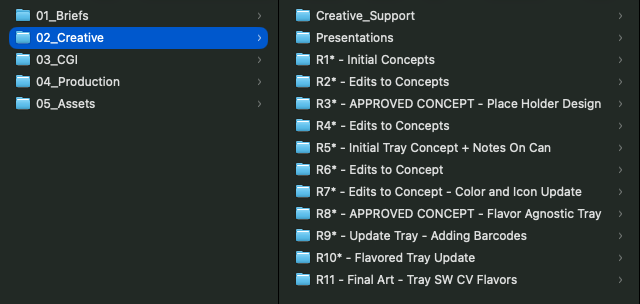
We treat every back/forth with Client as a “round,” each round gets it’s own folder within our job folders by job type. When a new client request/round begins, relevant files from the previous round folder are copied into the new round folder. This creates a lot of redundant files, but it protects each round’s work files. Within the round folders, the files themselves contain the job number, round number, and a version number (eg v1a, v1b, v1c, v2a, v2b - where numbers mean big changes, letters mean variations)
I save a separate milestone file for every approved revision and use a consistent format such as ProjectName_v03_Approved. Working files and approved files stay in separate folders, and I keep a short change log. That makes it much easier to return to an earlier direction without searching through dozens of files.
I keep one folder per project with three subfolders: 01_working, 02_client-review, and 03_final. Working files get named like logo_v03_2026-10-02.ai so the version and date are always in the filename, and every round sent out goes into 02_client-review as a PDF. Once the job is signed off, only the approved file goes in 03_final and the rest gets zipped for archive. It’s saved me more than once when a client asked to go back to an earlier round.