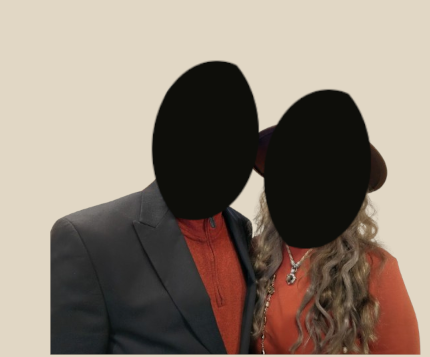
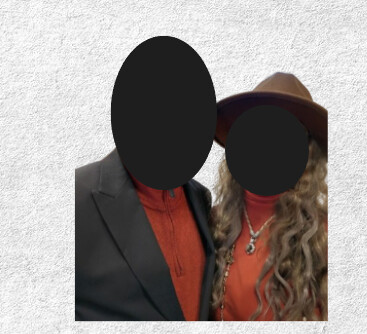
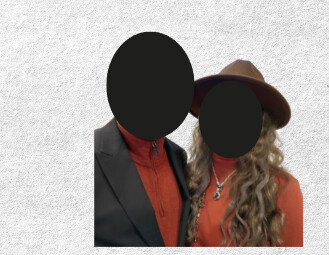
yes but that is more tolerable than the canva one where it squares up the whole bottom and side halfs. where as the tan one w/Gimp its less so.I tried making the pic a bit bigger on the canva one to include more of the shoulder w/the person w/the hat and it helped alil but from the shoulder down you still get a hard line, unlike the gimp one.
I did check cropping, i made the picture a lil bigger to help but it didnt help much- see attached. I tried smart cropping and that didnt help it chopped off parts of their heads and still gave a straight line across the top of the head.
There isn’t a ‘detach image from background’ on the pic either- which I believe answers the clipping path part of the question you had.
I’m not familiar with either of these apps, but you can narrow down the causes of errors in projects by reducing the number of options.
Create a new project and only place the people photo as a JPG.
Also, check the JPG in another app, such as the image preview app on macOS, Windows, or Linux, to ensure it is complete. Don’t do anything else.
To repeat what Steve-O asked, did you check for a clipping path in the image itself?
If the clip on the left is acceptable, I’m not sure what the problem is with Canva’s clip. They are both bad.
Fixing the clip on the guy’s sleeve is less than 3 minutes in photoshop (or gimp.)
I’ve never used Canva. Don’t intend to ever either.
I ended up opening it in Gimp and feathering it a bit so it isn’t as sharp and then reuploaded it to Canva. Generally I use GIMP but this time had to use Canva.
Crazy you can’t figure it out. It should be obvious.
Impossible to know without the actual image.
Can only guess. Maybe a clipping path on the image and that gets applied in the design application but not visible in the editing application.
Who knows.
Either way - the image data is there - you can see it - so it’s clipped some how.
It’s kind of like being shown two photos of a car one with a dent and one without and being asked why the dent exists, but without seeing the actual car or CCTV footage.