Adobe continues to raise their pricing model which puts it nearly out of reach for those who aren’t professional or engage in graphic design as a ‘professional hobby’ (as I like to describe my own role). I was able to sweet-talk Adobe into extending my student pricing for an additional year, but with the ability to activate a subscription on two separate machines, do users ever “split” a license? I realize this is probably not looked upon favorably by Adobe, but I do wonder if financially poor designers ever do this to cope with the cost. (And really, if Adobe allows activation on two devices…I don’t see this as being particularly unethical, but maybe that’s just me.  ).
).
With the two-machine license, the idea is you aren’t using them both at the same time. It’s right there in the EULA. You can use one while working at home or mobile, and one on a work station at work.
EULA Short Version:
(https://helpx.adobe.com/x-productkb/policy-pricing/end-user-license-agreements-faq.html)
Bottom line, it isn’t ethical.
Adobe can likely see what machines are attached via the Cloud.
Maybe you get a warning. Or maybe they bill you for a second license. Or maybe they pull the plug for violation of EULA…
My wife sometimes uses Photoshop, but the subscription is primarily for me. If I remember correctly, each Creative Cloud license can be activated on two separate machines, but only one can run CC at a time.
Looks like we both hit the submit button at the same time. 
Jinx

Adobe licences are named-user licences, so officially they’re intended for one person.
You can install Adobe apps on as many computers as you like, but you can only be signed in on two at the same time. You can’t actively use the same app on both simultaneously, if you do, you’ll be prompted to log out on one device. If you try to sign in on a third machine, you’ll need to deactivate one of the others.
So yes, some people do “split” licences, but it’s against Adobe’s terms, and it’s something they actively try to prevent.
As for cost: Adobe has increased prices over the years, which is hardly surprising, and I completely understand that it’s out of reach for some people especially hobbyists or semi-pros. That said, for a professional toolset, the pricing is broadly in line with other specialist software subscriptions.
Software subscriptions end up competing with everyday discretionary spending, clothing, petrol/diesel for vehicles, eating out, streaming services, takeaway coffees, gym memberships, phone upgrades, and other monthly subscriptions that people don’t always mentally total up.
There are cheaper or free alternatives:
Affinity now free, broadly comparable to Photoshop / Illustrator / InDesign (though no true Acrobat equivalent).
GIMP Photoshop-like raster editing.
Inkscape Illustrator-like vector work.
Scribus similar to InDesign.
They’re not drop-in replacements, particularly when it comes to CMYK workflows, spot colours, and print production, but for hobby or learning use they’re more than capable.
2 Likes
Thanks everyone. Appreciate the insights!
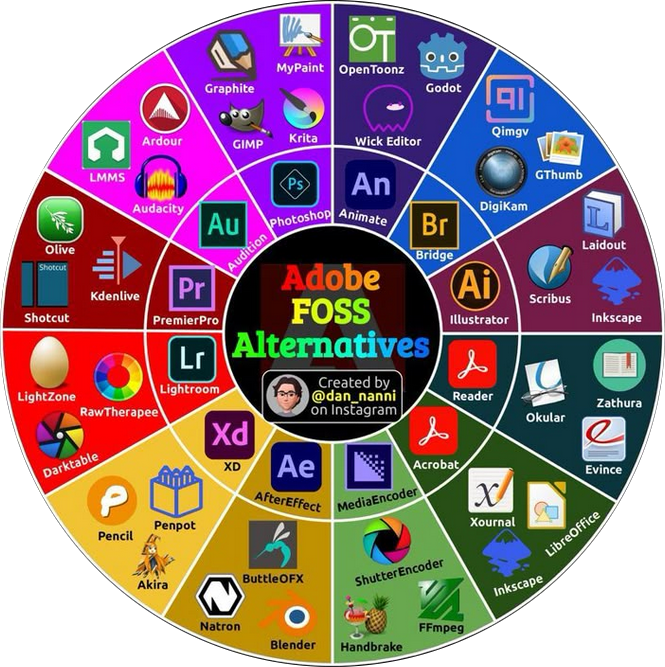
Have you tried through your Manage Subscription to cancel? You should get a favourable offer. But you could always try Affinity 3 which is free.
Affinity is no longer free. It is, up to a point, But if you want any functionality you start paying.
1 Like
Affinity Designer is “free” in someway, but there are some “canvas” services you should pay for if you want to use them.